Create a Portfolio
Last updated: May 29, 2026
You can upload your own custom portfolios directly into Alfa. This gives you a flexible starting point whether you're tracking a client mandate, modelling a fund structure, or comparing different strategies. Once uploaded, you can use these portfolios across chats and agents to generate tailored insights. Currently, portfolio uploads are done via CSV file - direct brokerage integrations are not supported at this time.
Upload a custom portfolio to your profile
To upload a portfolio, follow these steps:
Click on the Knowledge tab from the lefthand sidebar
Click on Portfolios from the top bar
Select Add portfolio on the righthand side of your screen
Drag and drop your file into the upload bar, or browse available files, then click Add portfolio
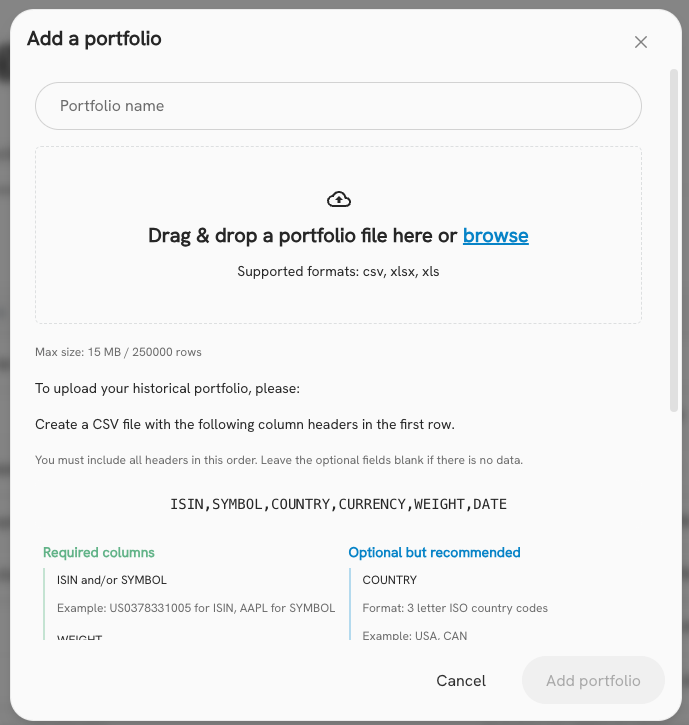
Instructions for portfolio file upload
Max size: 15 MB / 250000 rows
To upload your historical portfolio, please:
Create a CSV file with the following column headers in the first row: ISIN, SYMBOL, COUNTRY, CURRENCY, WEIGHT, DATE
You must include all headers in this order. Leave the optional fields blank if there is no data.
Please include your entire portfolio composition when a change was made.
If any given date does not contain a security that was included the date before, it is assumed to be sold off.
Required:
ISIN and/or SYMBOL
Example: US0378331005 for ISIN, AAPL for SYMBOL
WEIGHT
Format: The percentage weight of the security in your portfolio on the date
Example: 0.005 (0.5%), 0.01 (1%)
Optional:
COUNTRY
Format: 3 letter ISO country codes
Example: USA, CAN
We recommend you fill this column to make sure the correct securities are selected in the platform
CURRENCY
Format: 3 letter ISO currency codes
Example: USD, CAD
We recommend you fill this column to make sure the correct securities are selected in the platform
DATE
Format: YYYY-MM-DD
Example: 2023-03-30
If you do not enter a date, it will be filled as today's date.
You may download an example CSV by clicking the button below. In this example, AAPL is assumed to be sold on March 2nd, so the holdings to date would be 50% TSLA and 50% MSFT (before price adjustments).