Schedule your agent
Last updated: February 6, 2026
You can schedule your agent to run automatically on a recurring basis so that it always incorporates the most up-to-date information.
To schedule a report, follow these steps:
Navigate to the Agents tab in the lefthand sidebar
Select the agent you wish to schedule
Click the 'Schedule' button at the top-right of your screen

In the pop up, define your cadence in plain language (e.g. Weekly on Monday at 8 am)
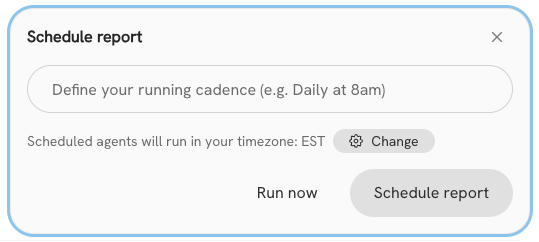
Hit 'Schedule' to confirm your cadence.
Tip: Hit Run Now to run an automated agent outside of its cadence.
Change or remove scheduling
To amend your schedule or remove automatic runs on an agent, follow these steps:
Navigate to the Agents tab in the lefthand sidebar
Select the agent you wish to change or remove scheduling for
Click 'Update schedule' at the top-right of your screen

Enter your new schedule, and hit update schedule. To remove scheduling, hit 'Stop scheduled runs'.